11th IT Chapter 3 Exercise – Impressive Web Designing | Maharashtra Board (Free Solution)
Table of Contents
11th IT Chapter 3 Exercise

Chapter 3 – Impressive Web Designing
Q 1. Answer the following
1) The data entry operator wants to insert.
1. Photograph
2. Write remarks about the photograph
3. Underline the heading
He will use:
1. <Image>
2. <Text>
3. <TextArea>
4. <Img>
5. <UL>
6. <U>
Select the correct tags from the above and arrange them in the sequence.
Answer:
1. Photograph – <Img>
2. Write remarks about the photograph – <TextArea>
3. Underline the heading – <U>
2) Identify the logical operators in JavaScript.
1. OR
2. AND
3. ||
4. &
5. &&
6. ++
Answer:
| |, &&
Q 2. Complete the following Activity
1) State atleast three attributes of <Input>
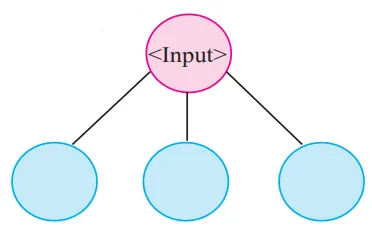
Answer:
- Value
- Size
- List
2)
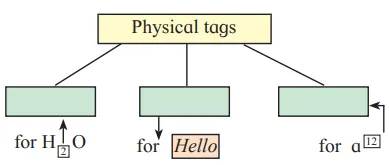
Answer:
a) <sub>
b) <i>
c) <sup>
3)
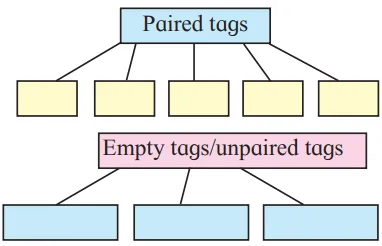
Paired tags
- <a>
- <form>
- <table>
- <Title>
- <head>
Empty tags/unpaired tags
- <img>
- <hr>
- <br>
4) Write operator names with symbol in boxes.
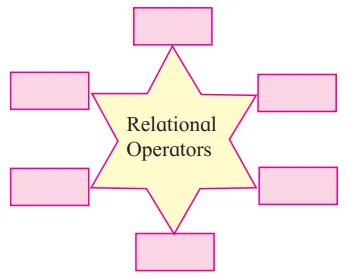
Answer:
- <
- >
- <=
- >=
- !=
5. Complete following program to display multiplication of 6.40 and 300
<!DOCTYPE html>
<html>
<head><title> Series </title></head>
<body>
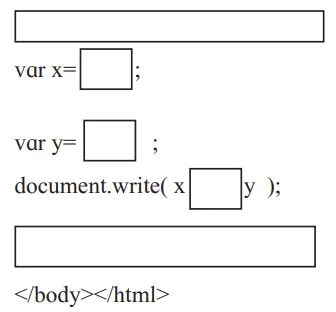
<html>
<head><title> Series </title></head>
<body>
<script language=”javascript”>
var x = 6.40 ;
var y = 300 ;
document.write(x * y)
</script>
</html>
Q 3. Find out error if any in following javascript code.
var length ,breadth;
length=4.5;
breadth=6;
area=1/2*length*breadth;
document.write(“Area of triangle is”area);
Answer:
var length, breadth;
length=4.5;
breadth=6;
area=1/2*length*breadth;
document.write(“Area of triangle is”area);
Answer:
Concatenate Operator ‘+’ is missing
document. write(“Area of triangle is” [+] area
Solution of other subjects
Solution of all the chapters of IT
1 – 2 – 4
Free online lecture on the above topic.
Q 4. Solve the following puzzles.
A) Fill the blocks
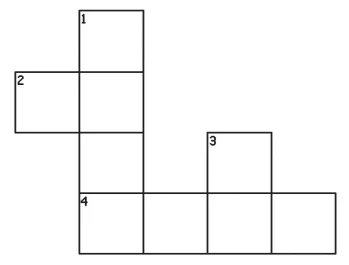
Across
2. The tag used to create table row.
4. Tag to create a form
Down
1. The attribute used to specify the path of a linked document.
3. The tag used to display horizontal ruled line.
Answer:
Across
2. tr
4. form
Down
1. href
3. Hr
B) Solve the puzzle by finding words with the help of hint given below.
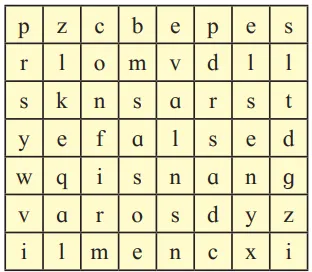
1) Boolean value.
2) Keyword used in conditional if statement.
3) Built-In function in JavaScript
4) Function to check given value is number or not
5) Keyword used to declare variable 6. Function used to evaluate given expression
Answer:
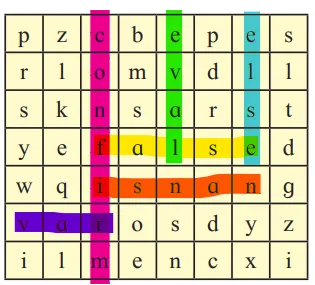
1) Boolean value. – false
2) Keyword used in conditional if statement. – else
3) Built-In function in JavaScript – confirm
4) Function to check given value is number or not – isNAN
5) Keyword used to declare variable – var
6) Function used to evaluate given expression – eval
Q 5. Trace the output of following html code.
‹!DOCTYPE html›
‹html›
‹head›
‹title›Heading tags‹/title›
‹/head›
‹body›
‹h1 align=left›Information Technology‹/h1›
‹hr›
‹h2 align=center›XI Standard‹/h2›
‹h3 align=right›Division‹/h3›
‹/body›
‹/html›
Answer:

Q.6 Answer the following questions.
Q.6 Discuss the following and Answer the questions.
1) A Jr. web designer wants to design a webpage to enter the employee name, address. He needs a button to clear the form content and submit the data.
- Write the different controls he will use to create the web page.
- State the tags to be used for the controls.
Answer:
‹!DOCTYPE html›
‹html›
‹head›
‹title›Form‹/title›
‹/head›
‹body›
‹form›
‹input type=”text” name=”employee_name” /›‹br /›
‹textarea name=”address”›‹/textarea›‹br /›
‹input type=”submit” /›‹br /›
‹input type=”reset” /›
‹/form›
‹/body›
‹/html›
2) A teacher has asked a student to create a web page to accept number and check whether it is between 50 to 100.
- List the variable, operators to be used.
- Specify the built-in function used and structure used.
Answer:
var number;
if(number > 50 && number < 100 )
Some examples of DDL commands are CREATE, ALTER, and DROP.
Solution of other subjects
Solution of all the chapters of IT
1 – 2 – 4
Q.7 Create webpages for the following.
1) Write a program using HTML to design your class Time Table.
Answer:
<!DOCTYPE html>
<html>
<body>
<h1>TIME TABLE</h1>
<table border=”5″ cellspacing=”0″ align=”center”>
<!–<caption>Timetable</caption>–>
<tr>
<td align=”center” height=”50″
width=”100″><br>
<b>Day/Period</b></br>
</td>
<td align=”center” height=”50″
width=”100″>
<b>I<br>9:30-10:20</b>
</td>
<td align=”center” height=”50″
width=”100″>
<b>II<br>10:20-11:10</b>
</td>
<td align=”center” height=”50″
width=”100″>
<b>III<br>11:10-12:00</b>
</td>
<td align=”center” height=”50″
width=”100″>
<b>12:00-12:40</b>
</td>
<td align=”center” height=”50″
width=”100″>
<b>IV<br>12:40-1:30</b>
</td>
<td align=”center” height=”50″
width=”100″>
<b>V<br>1:30-2:20</b>
</td>
<td align=”center” height=”50″
width=”100″>
<b>VI<br>2:20-3:10</b>
</td>
<td align=”center” height=”50″
width=”100″>
<b>VII<br>3:10-4:00</b>
</td>
</tr>
<tr>
<td align=”center” height=”50″>
<b>Monday</b></td>
<td align=”center” height=”50″>Eng</td>
<td align=”center” height=”50″>Mat</td>
<td align=”center” height=”50″>Che</td>
<td rowspan=”6″ align=”center” height=”50″>
<h2>L<br>U<br>N<br>C<br>H</h2>
</td>
<td colspan=”3″ align=”center”
height=”50″>LAB</td>
<td align=”center” height=”50″>Phy</td>
</tr>
<tr>
<td align=”center” height=”50″>
<b>Tuesday</b>
</td>
<td colspan=”3″ align=”center”
height=”50″>LAB
</td>
<td align=”center” height=”50″>Eng</td>
<td align=”center” height=”50″>Che</td>
<td align=”center” height=”50″>Mat</td>
<td align=”center” height=”50″>SPORTS</td>
</tr>
<tr>
<td align=”center” height=”50″>
<b>Wednesday</b>
</td>
<td align=”center” height=”50″>Mat</td>
<td align=”center” height=”50″>phy</td>
<td align=”center” height=”50″>Eng</td>
<td align=”center” height=”50″>Che</td>
<td colspan=”3″ align=”center”
height=”50″>LIBRARY
</td>
</tr>
<tr>
<td align=”center” height=”50″>
<b>Thursday</b>
</td>
<td align=”center” height=”50″>Phy</td>
<td align=”center” height=”50″>Eng</td>
<td align=”center” height=”50″>Che</td>
<td colspan=”3″ align=”center”
height=”50″>LAB
</td>
<td align=”center” height=”50″>Mat</td>
</tr>
<tr>
<td align=”center” height=”50″>
<b>Friday</b>
</td>
<td colspan=”3″ align=”center”
height=”50″>LAB
</td>
<td align=”center” height=”50″>Mat</td>
<td align=”center” height=”50″>Che</td>
<td align=”center” height=”50″>Eng</td>
<td align=”center” height=”50″>Phy</td>
</tr>
</table>
</body>
</html>
2) Write a program using HTML to create a form and submit it with personal data like name, address and standard.
Answer:
<!Doctype Html>
<Html>
<Head>
<Title>
Create a Login form
</Title>
</Head>
<Body>
The following tags are used in this Html code for creating the Login form:
<form>
<label>Name: </label> <br>
<input type=”text”> <br> <br>
<label>Address:</label> <br>
<input type=”text”> <br> <br>
<input type=”submit” value=”Submit”>
</form>
</Body>
</Html>
3) Write a javascript program to accept two numbers and perform addition of two numbers by using mouseover event
Answer:
<!doctype html>
<html>
<head>
<script>
function add()
{
var numOne, numTwo, sum;
numOne = parseInt(document.getElementById(“first”).value);
numTwo = parseInt(document.getElementById(“second”).value);
sum = numOne + numTwo;
document.getElementById(“answer”).value = sum;
}
</script>
</head>
<body>
<p>Enter the First Number: <input id=”first”></p>
<p>Enter the Second Number: <input id=”second”></p>
<button onmouseover=”add()”>Add</button>
<p>Sum = <input id=”answer”></p>
</body>
</html>
Q.8 Complete the following.
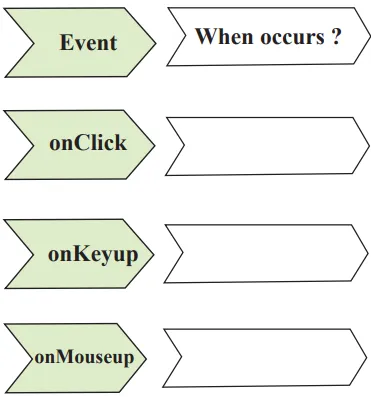
- onClick – When a user clicks an element
- onKeyup – When a user releases key
- onMouseup – When a user releases a mouse button over an element
a) one to one
b) one to two
c) one to many
d) many to two
e) many to many
f) one to three
Solution of other subjects
Solution of all the chapters of IT
1 – 2 – 4
Q.9 Write HTML Code for the following table.
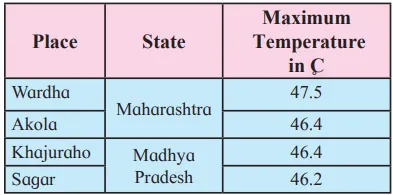
Answer:
‹table border=”1″ cellpadding=”10″›
‹thead bgcolor=”pink” align=”center”›
‹tr›
‹th›Place‹/th›
‹th›State‹/th›
‹th›Maximum‹br›Temperature‹br›in C‹/th›
‹/tr›
‹/thead›
‹tbody bgcolor=”skyblue” align=”center”›
‹tr›
‹td›Wardha‹/td›
‹td rowspan=”2″›Maharashtra‹/td›
‹td›47.5‹/td›
‹/tr›
‹tr›
‹td›Akola‹/td›
‹td›46.4‹/td›
‹/tr›
‹tr›
‹td›Khajuraho‹/td›
‹td rowspan=”2″›Madhya‹br›Pradesh‹/td›
‹td›47.5‹/td›
‹/tr›
‹tr›
‹td›Sagar‹/td›
‹td›46.2‹/td›
‹/tr›
‹/tbody›
‹/table›
Q.10 Multiple Choice One Correct Answer
1) The default method of submitting form data is…………..
a) Post
b) Get
c) Submit
d) Reset
2) In JavaScript the post increment operator is …………..
a) x++
b) x–
c) –x
d) ++x